Retrieve Configuration
Progressive loading works in steps called stages. Each stage is part of which images load with which settings, and you can set each stage with different settings, known as retrieve options. Together (stages and options) make up the retrieve configuration, which manages how images are loaded step by step. Let's dive in.
interface IRetrieveConfiguration {
  stages: RetrieveStage[];
  retrieveOptions: Record<string, RetrieveOptions>;
}
Retrieve Stages
As the name of progressive loading suggests, the loading process is done in
stages. Each stage can be configured to use a different retrieve method (streaming or byteRange) and its common or specific retrieve options.
Since you can have multiple stages, the two methods (streaming and byte range) can be combined and utilized at different stages.
For instance you can create a configuration that
- start streaming of specific initial slices (typically the first, middle, or last slice) for immediate viewing.
- Subsequently, in the second stage, byte range requests (only couple of
kb) can be made for the rest of the slices to efficiently render the complete volume as quickly as possible (even if lossy). - Finally, you perform supplementary byte range requests for the remaining segments that have not yet been requested, following the initial byte range request in step 2.
This approach is actually employed in the volume loading process, which will be further elaborated upon in our subsequent discussion.
So, in summary, the Retrieve Stage is a configuration that specifies which images load with which settings. For the simplicity of this document and to not lose focus, we will only talk about the retrieveType, which is just a reference to the retrieve options. We will discuss more advanced options, such as selecting images for strategy, prioritizing, and queuing loading, later.
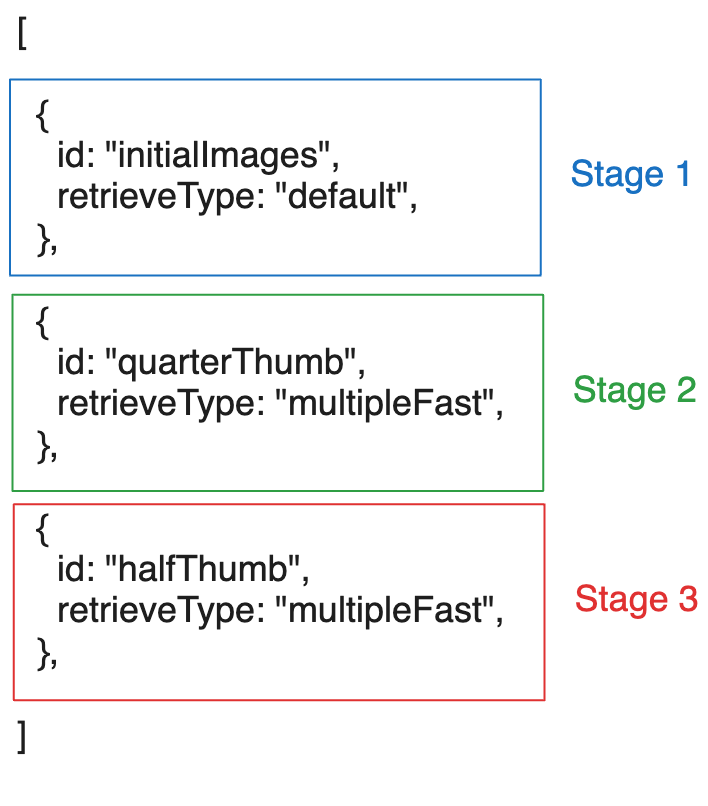
As seen above, the retrieve stages can be as simple a list of objects, each with an id
and a retrieveType (which is a reference to the retrieve options which we will talk next).
The retrieveType is an optional string that is only used for referencing the option to be used. You can use any string as long as you are consistent in using it in the retrieve options as well. Use 'lkajsdflkjaslfkjsadlkfj' if you wish (but then you should have an object
with key of 'lkajsdflkjaslfkjsadlkfj' in the retrieveOptions object as we will see below).
What would happen if we reference a retrieve type that is not defined in the retrieve options?
Cornerstone will check if a default retrieve options is specified, if true, it will use that otherwise will ignore the progressive loading configuration and will load the image as if progressive loading is not enabled (like before)
Retrieve Options
Now we an talk about retrieve options for each of the methods (streaming or byte range) in more detail. Let's dive into the common options first.
Common Options
There are more advanced options for the retrieval configuration that can be used to handle more use cases. We will talk about them later in another section.
Decode Level (quality)
One natural question that might arise is, regardless of the method (stream or byte range) how often the image is decoded and when we decode what is the resolution of the image that we should decode to?
The resolution of decoding is controlled by decodeLevel configuration and it can be
- 0 = full resolution
- 1 = half resolution
- 2 = quarter resolution
- 3 = eighth resolution
- ...
So if the decodeLevel for a stage is set to 0, then the image will be decoded to full resolution. If it is set to 1, then the image will be decoded to half resolution (x/2, y/2) and so on.
For HTJ2K, setting decodeLevel: 0 on a partial (byte range or streaming)
retrieve is usually the right choice. The decoder tolerates a truncated
codestream, so a partial retrieve decodes at full size and is merely lossy,
which loses considerably less than decoding a sub-resolution image and scaling
it back up afterwards. Such an image is reported as LOSSY rather than
SUBRESOLUTION, and only counts as FULL_RESOLUTION once the whole frame has
arrived.
Sub-resolution decoding plus scaling remains the right choice for renditions that are genuinely small, such as JLS thumbnails, and for transfer syntaxes whose decoders cannot read a truncated stream.
Truncated HTJ2K decoding requires @cornerstonejs/codec-openjph 2.4.10 or
later. Older builds throw on a truncated codestream instead of decoding it.
For volume viewports, we currently don't allow decoding into sub-resolution because it would require reallocating the volume in memory, which is inefficient. Therefore, if the data is partial and can't be decoded into full resolution, we simply replicate it (inside a web worker for performance) to fill the entire volume.
However, for the stack viewport, we do allow decoding into sub-resolution since this re-allocation is cheaper than the whole volume. Additionally, in this scneario, future enhanced qualities of the image will wipe out the old image and create a new image with new size until full resolution is reached.
We will talk about frequency in the each method's section below.
Partial decoding is HTJ2K only
Everything below about decoding a partial image applies only to HTJ2K. The
decision is not a configuration option — it is a fixed list of transfer syntaxes
in streamableTransferSyntaxes (imageLoader/wadors/loadImage.ts), currently:
| Transfer syntax UID | Meaning |
|---|---|
3.2.840.10008.1.2.4.96 | HTJ2K, private/pre-ratification UID |
1.2.840.10008.1.2.4.202 | HTJ2K (RPCL) — reliably streamable |
1.2.840.10008.1.2.4.203 | HTJ2K lossy — attempted, may not be |
When a partial buffer arrives whose transfer syntax is not on that list, the decode is skipped and the loader waits for more data; the image is decoded once the frame is complete. So for every other syntax, byte range and streaming retrieves still control how the data is fetched, but the image is only ever decoded once, at full quality.
Two consequences worth knowing:
decodeLevelis only honoured by the HTJ2K decoder. Setting it for another syntax has no effect.- Tuning
initialChunkSizedown for a non-HTJ2K syntax does not lower quality; it can only add a round trip before the first (complete) decode.
The list is a module-level constant rather than a setting, so adding a syntax to it means changing that file — appropriate only for a codec that can genuinely decode a truncated codestream, since one that cannot will throw instead.
JPEG XL is a case in point. The format supports progressive decoding, but
@cornerstonejs/codec-libjxl closes its input up front and rejects a truncated
codestream, so JPEG XL is deliberately absent from the list even though it
decodes normally. Adding it would need the codec to adopt libjxl's
JxlDecoderSetProgressiveDetail/JxlDecoderFlushImage path first.
Streaming Options
Options
For streaming requests, you can configure the following options:
streaming: whether to use streaming or notinitialChunkSize: bytes that have to accumulate before the first decode (default is 128kb). The stream shows nothing until this much has arrived, so it sets the time to first image. 32kb already decodes, but on a high resolution frame that much codestream spreads over so many pixels that the first image adds little, and the decode then repeats almost immediately.chunkSize: bytes that have to accumulate between one decode and the next (default is 128kb). By then the image is already displayed and the job is refining it, so decoding after every small addition would only mean more work for the same result.minChunkSizeis the former name for this option and is still honoured.msBetweenDecode: minimum milliseconds between two decodes of the same partial image (default is 500). Chunk size bounds how often data arrives, but on a fast connection that still outruns what a display can use - decoding is far more expensive than receiving - so this throttles refinement to a readable rate. A completed image is always decoded, so this only ever delays intermediate versions, never the final one. Set to 0 to decode on every chunk.
msBetweenDecode only has an effect here. A byte range stage decodes once, when
its range arrives, so there is no second decode for the clock to hold back; on
that path the range sizes alone control how often a partial image is decoded.
Decoding Frequency
Setting decodeLevel: 0 overrides everything in this section: the partial
codestream is then decoded at full resolution however little of it has arrived.
That is the preferred setting for HTJ2K. The levels below apply when
decodeLevel is not set.
Most often, when the stream is coming from a server, the server lets the client know about the final size of the data. So, at each point in time, we can identify the percentage of the data that has been downloaded and decode the image to the relevant resolution so in the streaming scenario you really don't have to set it manually.
Different levels are, if the downloaded portion at the time of decoding is
- < 8 % of the total data, then decode to level 3
- 8 < x < 13 % of the total data, then decode to level 2
- 13 < x < 27 % of the total data, then decode to level 1
- < 100 (means it is not finished) then decode to level 0
- 100 % of the total data (stream is finished), then decode to level 0
How did we come up with these levels? It is kind of simple.
For instance, if we have only downloaded 1/16th of the total data, it means we have downloaded 6.25% of the data (8% is 6.25% with some offset). This means we can decode the image to 1/16th of the original size, which is level 4. However, the interpolation provided by the decoder is slightly better than that provided by straight image rendering, and thus one can decode to a slightly lower level, using level 3 instead. The same goes for the rest of the levels.
To answer the question of how many decoding levels will occur, it totally depends on the initial data that is downloaded and how the stream progresses. But at any given time when the data is downloaded, we check the progress against the above levels and decode the image to the relevant resolution if possible. If an error is thrown or the image is not decoded, we simply wait for the next progress event to occur.
Example
For the simple streaming scenario (streaming true) you should expect the following behavior:
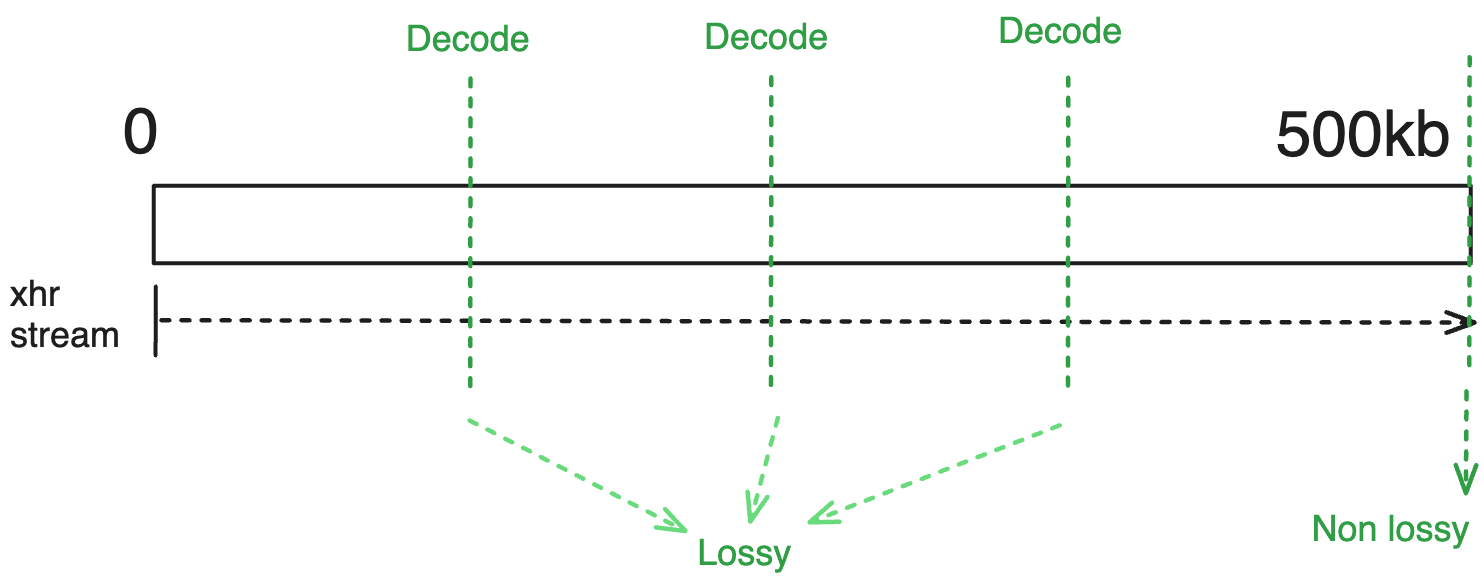
Use cases
using the streaming method is suitable for the scenarios that you eventually require the full resolution of the data and you want to start viewing the data as soon as possible.
Byte Range Options
Options
initialChunkSize: byte range to retrieve for the first decode, atrangeIndex0 (default is 128kb). Small on purpose, because it is the shortest path to something on screen. 32kb also decodes, but it is too little for a high resolution frame to show much.chunkSize: bytes added by each range after the first (default is 128kb). By then the image is already displayed and the job is refining it, so fetching the remainder in smaller steps would only mean more requests and more decodes for the same result.rangeIndex: is the range number (index) that you want to fetch, -1 for remaining data
Note that there is no guarantee that the rangeIndex will actually fetch another range since it will discontinue fetching once all the data has been fetched. Also, -1 is used to flag the "remaining" data.
msBetweenDecode has no effect on a byte range retrieve. A range stage decodes
once, when its range arrives, so there is no second decode for the clock to
hold back. The range sizes alone control how often a partial image is decoded
here. The option applies to a streaming retrieve, where one request delivers
many partial versions of the same image.
The first stage of a frame fixes initialChunkSize and chunkSize for that
frame. Both are read on the stage that fetches the first bytes, and every later
stage of the same frame reuses those values, because the ranges of one frame
have to agree on where their boundaries fall. A chunkSize set on a later
stage is ignored, and that stage fetches to the boundary the first stage
implied instead.
So set both on the stage that retrieves rangeIndex 0:
retrieveOptions: {
  // Correct - the first stage sets both sizes for the whole frame.
  singleFast: { rangeIndex: 0, initialChunkSize: 16384, chunkSize: 262144 },
  singleMiddle: { rangeIndex: 5 },
  singleFinal: { rangeIndex: -1 },
}
Written the other way round, with chunkSize: 262144 on singleMiddle, that
stage would fetch to 16384 + 5 * 128kb rather than to 16384 + 5 * 256kb.
Decoding Frequency
There are two scenarios for byte range requests:
- If the server sends back the total size of the data in the header of the response for the byte range in which we use our automatic decoding frequency (similar to the streaming scenario).
- The server does not send back the total size of the data in the header of the response for the byte range in which we wait until the range request is finished and then decode the image.
The server should send the cors header Access-Control-Expose-Headers: * to
enable reading the Range-Response header required for seeing the total size.
Otherwise, the range request is finished when the multipart/related header
is complete OR the returned data is smaller than the requested data.
Example
For instance for the options of
{
  rangeIndex: 0,
  initialChunkSize: 256000, // 256kb
}
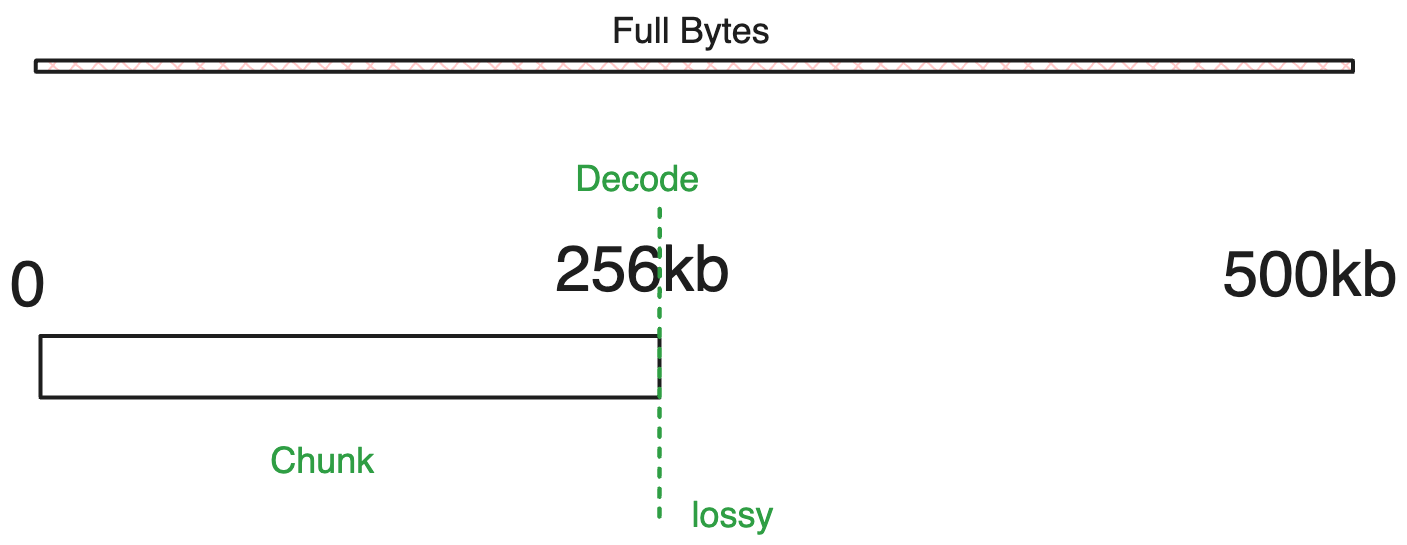
another example
{
  rangeIndex: 0,
  decodeLevel: 3
}

// initialChunkSize is default 128kb
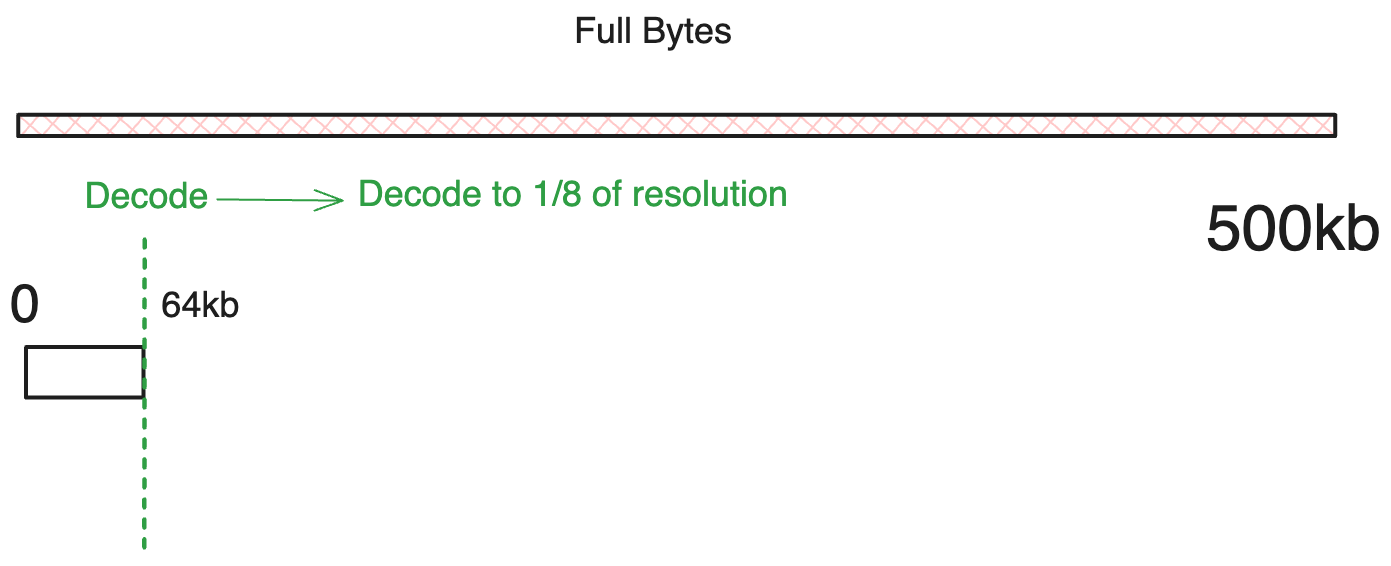
You can fetch the remaining data by using rangeIndex: -1.
In addition, rangeIndex = 0 will always be the first chunk.
Range 0 covers initialChunkSize and every range after it adds a full
chunkSize, so the end of range n is at
initialChunkSize + n * chunkSize. A stage always starts from the data
already retrieved, so skipping indices simply fetches a larger span.
For instance, with the defaults (128kb initial, 128kb thereafter):
rangeIndex 0:0to128k-1(in bytes)rangeIndex 5:128kto128k + 5*128k - 1(in bytes)rangeIndex 25:128k + 5*128kto128k + 25*128k - 1(in bytes)rangeIndex -1:128k + 25*128ktototalSize(in bytes) - the rest of the data
This use of rangeIndex allows retrieving larger increments to agree with the amount of data required for decodeLevel values.
What if I start with a range 1 instead of 0?
Cornerstone will automatically fetch the range 0 combined with range 1 as a single request. This avoids needing to perform multiple intermediate requests.
Use cases
Other than we can use the range request to progressively request and load a better quality images there are some other usecases
- Thumbnails: Often, for thumbnails, we want to load the image as quickly as possible but don't need the full resolution. We can use a byte range request to fetch a lower resolution version of the data.
- CINE: For certain imaging needs, the frame rate is absolutely essential in the cine mode. Often, the gross anatomy is desired in these scenarios, not the details, but the frame rate is of greater importance. We can use the byte range request to fetch the subresolution of the data, guaranteeing that we can achieve the target frame rate.
In the future, a separate memory cache might be used for range request details, but right now the intermediate data is held alongside the image data. Storing it in a cache would allow for CINE display with only the cost of decoding the image.
Conclusion
So, we learned that a "retrieve configuration" is composed of at least one (can be more) "retrieve stage" and an accompanying "retrieve options" that have the keys referenced in the "retrieve stages." We also learned that each "retrieve stage" can be configured to use a different method (streaming or byte range) and has common or specific retrieve options.
Let's look at an example of one of the examples that we have in the stackProgressive demo
const retrieveConfiguration = {
  stages: [
    {
      id: 'initialImages',
      retrieveType: 'single',
    },
  ],
  retrieveOptions: {
    single: {
      streaming: true,
    },
  },
};
Note the common use of 'single' in both the stages and retrieveOptions objects. This is just a reference to the retrieve options that we have defined in the retrieveOptions object.
Now your question might be, how do we use this configuration? We will talk about that in the next section. But curious readers can move to the advanced configuration section to learn more about the advanced options that we have for the retrieve configuration.